Posts

Showing posts with the label dingoo digital

Dingoo Pocketgamer review!

As kinda foreshadowed by Craigx in the post below, Pocketgamer.co.uk has posted a new Dingoo review! Information wise, there is nothing new in it which readers of the various dingoo forums or this blog won't recognise, but it's nice to see the Dingoo pop up on a site like Pocketgamer! The review is here: http://www.pocketgamer.co.uk/r/Various/Dingoo+A-320/hardware_review.asp?c=12910 As a bonus, you'll get to find out Craigx's second name.

While waiting for MAME: Dingoo running Mr Do!

One of the reasons I hanker for MAME in every system is that I want to play Mr Do! Sure, you can probably get Neo Mr Do! to work via the Neo Geo emulator on the Dingoo, but nothing works like the pure gameplay of the original, and the best – all 175 K of it! Fortunately, even without MAME, someone to whom we are all grateful worked out how to emulate the arcade ROM on the GBA. Here it is running on the Dingoo!: Nothing beats the pure satisfaction of taking out 4 monsters in one hit AND completing the EXTRA life bonus with a single ball. Click here for the link to your own arcade emulated Dingoo Mr Do!

Retrogamer2k9’s facts about the Dingoo

Retrogamer2k9 indicates that : “The N64 can NEVER be emulated on the Dingoo. Not only because the Dingoo is way too slow for that, but also because it has no 3D hardware acceleration. But that is needed, as LLE of the N64's graphics chip has not been archieved yet (all attempts made so far are crappy and slow even on the fastest PC). Amiga is a no-go either, unless you do a very basic HLE of an A500 or porting some old DOS crap like Fellow. and “It runs a custom OS made for/by Chinachip, just like any other PMP with the Ingenic chip.” Good information. Thanks retrogamer2k9!

Dingoo-Digital provides further information about the A320!

Most impressively, within 24 hours of asking Dingoo-Digital’s representative over at the A320 free forums some follow up questions from our original Dingoo Digital Interview , Sofia has provided even more information on the Dingoo and Dingoo’s future plans. The following is reproduced from the A320 freeforums. These were my follow up questions: Hello, Sofia, it is wonderful to see a Dingoo representative here. Today, Jim from Dingoo-Digital answered some questions for me at www.dingoo-scene.blogspot.com about the Dingoo A320. [url]His answers are here http://dingoo-scene.blogspot.com/2009/0 ... rview.html[/url] Jim was very helpful, and it was exciting to hear from Dingoo itself! His answers raised even more questions for us, which I hope you can help to answer. We asked Jim: "Will more emulators will be made for Dingoo(for example, C64, MAME, PCEngine?) For A320 , will not make more emulators. For other new product , maybe we could ...

Dingoo representative at a320.freeforums.org !

Sofia, a representative of Dingoo, is now available at http://a320.freeforums.org/ ! This is her post: Hello every one, Good day there! This is Sofia from Shenzhen Dingoo Digital Product Company. Thank you all of you have so much interesting on our Dingoo A320 firstly! And , I'd like to be your friend helping you to know this item well. Our company is really a leading manufacturer of 3D game consolers in China. I guess all of you already knew this ,right? ^_^ Thus, I hope I can do as much as possible to lead you feel easy on A320. Also, I expect to discuss and share with all of you in order to improve my professionality. If , any of you need to buy this for try or wholesale, it will be my greatest honor to service for you ! P.S:My email address is : sofia@dingoo888.com " Have fun ! This is an excellent development! Any other questions for Dingoo? Join the discussion at this thread: http://a320.freeforums.org/hi-let-me-introduce-myself-t15-10.html#p63

Support the Dingoo A320!

Image
Read the post below this first! It's no surprise that no new emulators appear to be planned for the A320. Reading into the Dingoo Interview , and knowing there are hundreds of these products on the Chinese market, it is probably the case that the Dingoo A320 is just another model number, with a limited product lifespan, in a very competitive market. Plus, there's the whole world financial crisis thing! In the midst of a financial crisis though, what better than to buy a little, affordable piece of joy like the Dingoo? This is the perfect picker upper to gloomy times. So, though it's certainly nowhere near extinction at the moment .... I honestly don't think Dingoo themselves appreciate what a gem of a product they have in the A320. This is the little PMP-Emulator that COULD! But capable or not, we have to face facts that the A320 will inevitably die, unless WE do something about it. What can we do? The best way to show there is a Worldwide Market is to order one...

Exclusive Dingoo Digital Interview

Dingoo-Scene recently put some questions to Jim, a spokesperson from Dingoo Digital. The following are the questions and answers received: Dear Larry Thanks for your email. 1. Will more emulators will be made for Dingoo(for example, C64, MAME, PCEngine?) For A320 , will not make more emulators. For other new product , maybe we could provide more emulators , such as psp emulator . 2. Will the existing emulators continue to be improved? (for example, the SNES emulator, for example, is a disappointment to some people) Yes. will be continued to be improved. 3. Will new firmware be made? What is the planned release cycle? Will this provide new features? Yes, new firmware will be made, to make the system more stable. I don't think so it will provide new features. 4. How big is your research and development team, working on the Dingoo A320 firmware, emulators and software? 15 for firmware, emulators , 40 for 3D games. 5. Are you ...

Download Dingoo SDK here

Click here to download what is apparently NOT the Dingoo SDK . (see the comments - this may be for the Gemei A720, as it happens). Warning - it's about 173 megs in size! However, from the Dingoo interview , it is now confirmed that the Dingoo SDK is at: http://soft3d.org/ Further, Dingoo representative Sofia has the following to add so hopefully, it will be easier to access for non-Chinese readers soon: "Q: . Many people would like to download the SDK from http://soft3d.org/ , but it very hard for non-chinese speaking people to log-in, and to find the files. Dingoo-scene.blogspot.com , or I am sure, these forums, would be very happy to host copies of the SDK on our server, if you could help us to get the SDK. Can you help? A: Well , this is really a problem as we all realized it already. And, our company will try to work out some other places for down loading the SDK. Of course we will make it in English language as well. And for now, we only responsible to...

Dingoo running SNES Earthbound Rom

Ask and you shall receive! By popular request on the DX Dingoo forum, this video shows the Dingoo running Earthbound via the SNES emulator. I had to film the output on a TV screen as my camera wouldn't clearly focus on the Dingoo screen at close distance. However, you can see from the various menu shots that this is not a fake and that the game is really running on the Dingoo's SNES emulator. I don't know this game at all (looks good though), but it seems to be running well to my untrained eye. On the poorly regarded SNES emulator too!

EvilOverlord's NEO-GEO and CPS Emulation review!

Pictures speak a thousand words. It's not easy to work out from the forums whether the higher end systems emulate well or not. Watch EvilOverlord's video, and judge for yourself! To be perfectly frank, if you're still not essentially satisfied with the Neo-Geo/CPS2 emulation, there's a good chance you think calling 911 when McDonalds runs out of nuggets makes sense!

Dingoo emulator files

This is a link to the emulator files which are stored in the Dingoo's 4GB of internal RAM, in case they get deleted by accident or something.

Neo Geo Rom Compatibility list

List is here: http://www.dj-rico.nl/dingoo/neogeo/index.htm Thanks to masscbd@hotmail.com ! Email any updates to him.

How to change volume!

There is no hardware volume key! It's minor, inconsequential omissions like this that lets you buy a Dingoo for such craaaaaaaaaaaaaazy low prices! If you nevertheless think you might like to adjust the sound from time to time, the volume adjustment is: Start + Up or Down Or hunt down the software volume control in each individual application, if you don't fancy the above. Actually, the shortcut above doesn't work in the GBA emulator. In this emulator, you need to: Press SELECT + START -> Select "Misc. Settings" -> Volume -> Adjust with keypad Ahh well, remember how cheap it is. Remember how cheap it is.

Dingoo User Manual

Image
Here is a scan of the user manual in case you've lost it, just want to know what it does, or are wondering how much Dingoo paid for technical writing. (Click on each page to load a bigger image). If you prefer, a PDF of the manual is here . Postscript 8 March 2009: I've now actually read the manual, and my advice is to treat it all with a pinch of salt! Anyone brave enough to update the firmware, for example, following the instructions in the manual, has megalos kahunas of steel.

Mini-SD, TF or SD?

Image
There's been some discussion on the DealExtreme forums about whether the memory card slot is for Mini-SD or regular SD. It's a Mini-SD (And warning, Will Robinson - Mini-SD is not Micro-SD, or TF (Transflash)!!!) Some people have also wondered whether the Mini-SD card sits flush, or sticks out when inserted, and if so, how much by. Answer, about 1 mm; no more. Don't let it stop you buying one. It's hardly noticeable. Honest.

How to set to English!

Image
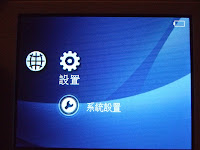
Unless you read Chinese, the first thing you're likely to want to do is set the Dingoo to English. Problem is, all the menus are in Chinese! Here's where to find the language selection in the menu: Turn on -> Go to Setup (Cog Icon on far right) -> Press A -> Press down 5 times (Menu item for language is in the 6th Row (as shown below)) -> Press A -> Scroll down to select English Voila, English. Now you don't have to pretend you're an extra on Serenity .

Welcome to Dingoo-scene

The Dingoo A320 is potentially a nice piece of kit. Great name, evocative of a wild, feral machine which will one day take your baby! Same about the lack of English language support. The aim of this site is to consolidate as much information on the Dingoo in one spot. You may not get the latest news, or the best news, or heck, even the right news, but I’ll do my best, and I need your help. Anything to add? Able to read chinese, and understand what's going on on the Dingoo chinese site? Contact me (larry(at)gadgetmiser.com) or leave a comment.